Every carrier places parcel in order to deliver them in a timely manner on their route.
I did this in the office for years, usually taking 1/2 hour per day, longer on Mondays.
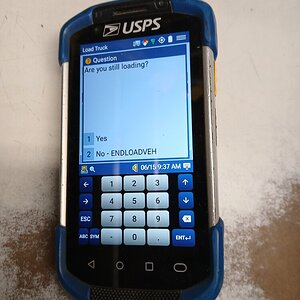
Using the "Load truck" feature WHILE IN LOADING TIME, you can place parcels in order at the same time as you are loading your vehicle increasing your loading time up to one hour + per day. This is totally legit, and an accepted practice by the Usps.
Here's how you do it by entering these
entries on your scanner in this order:
1) Start load
2) Esc
3) Load truck
4) Scan each parcel
scanner will show the # order of the parcel (being delivered that day) according to your edit book and tell you the section of the vehicle that parcel belongs.
New to the route carriers often times write the order # on the parcel and place it in order. Seasoned carriers usually just place them in order.
The reason this helps increase your loading time is because you are placing your parcels in order, as all carriers do, during LOADING TIME, instead of in the office. We do get some, very little, time under Rrecs to place parcels in order, and even to reorganize/move them up in the vehicle, but why not do it under loading time and legally double dip. No one that uses this method has lost evaluation time in our office.