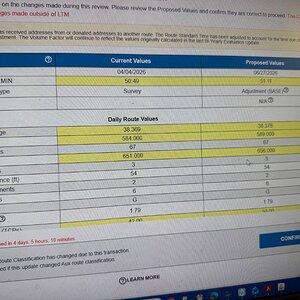
• Everyone, please help make our jobs easier and choose the correct category. Thank you

New benchmarking???

View attachment 16450

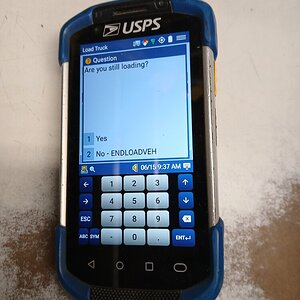
I had just finished scanning last of my packages on load truck and this scanner message popped up. Literally like 2 mins after I scanned last of my packages.

Is this not "benchmarking." Where is the union at on stuff like this?? Do something.

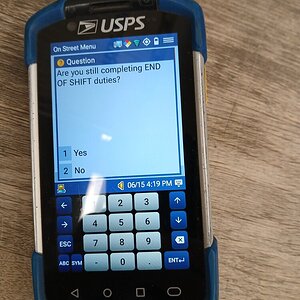
Here is EoS. I have to be on some naughty list today. 3 times during load and 3-4 times during EoS.View attachment 16457

Hey I have solution to all of this. If you missed endload and depart2route it goes by GPS signal of you leaving the USPS office and if you get out of the USPS area and you didn't hit that stuff, it sets off an alarm. EoS !@##%ING SIMPLE. You dock scanner and it clocks out automatically. Holy :poop: :poop: :poop: :poop: :poop: . So dumb.
It’s not benchmarking. They are not requiring a set amount of time but are simply checking on progress. I assume that carriers that have been questioned about lengthy Load & End times used the “I forgot” excuse.
This eliminates it. It is an annoyance & it adds extra time to have to babysit the Scanner.
 
It’s not benchmarking. They are not requiring a set amount of time but are simply checking on progress. I assume that carriers that have been questioned about lengthy Load & End times used the “I forgot” excuse.
This eliminates it. It is an annoyance & it adds extra time to have to babysit the Scanner.

Could be done without stupid reminder. Is that what management is for??????

EoS dock scanner it clocks you out. PROBLEM SOLVE

End & Depart if you forget and start driving, it sends alert when you leave area around post office. SOLVED

Also what about forgetting to hit RETURNLUNCH???? GUESS THAT DON'T MATTER.

There's more to than the I forget excuse.
 
Last edited:
Could be done without stupid reminder. Is that what management is for??????

EoS dock scanner it clocks you out.

End & Depart if you forget and start driving, it sends alert when you leave area around post office.

Also what about forgetting to hit RETURNLUNCH???? GUESS THAT DON'T MATTER

There's more to than the I forget excuse.
Mgmt reminding us to end a time standard could be harassment.

I do have call into my Steward but it will likely come back from higher up that “as long as it is during the timed function, no harm is done”.
 
I'm just gonna remove the battery after I hit startload/return2du, once I finish loading up/end of shift duties then I'll log in to endload/clockout
The scanner also tracks every time the battery is removed and the location where it happened.

City carriers were pulling batteries on the street. An immediate alert is sent to management and they are supposed to go check on the carrier.
 
View attachment 16450

I had just finished scanning last of my packages on load truck and this scanner message popped up. Literally like 2 mins after I scanned last of my packages.

Is this not "benchmarking." Where is the union at on stuff like this?? Do something.

Here is EoS. I have to be on some naughty list today. 3 times during load and 3-4 times during EoS.View attachment 16457

Hey I have solution to all of this. If you missed endload and depart2route it goes by GPS signal of you leaving the USPS office and if you get out of the USPS area and you didn't hit that stuff, it sets off an alarm. EoS !@##%ING SIMPLE. You dock scanner and it clocks out automatically. Holy :poop: :poop: :poop: :poop: :poop: . So dumb.
💩 This make me so glad I am not a carrier anymore. Though there is now similar things going on in maintenance….
 
What I noticed:

Load time: 25 minutes then beeping starts!

EOS: 10 minutes then beeping starts!

It’s gonna be fun on Mondays and day after holidays!

And while dmp/ltm!
 
What I noticed:

Load time: 25 minutes then beeping starts!

EOS: 10 minutes then beeping starts!

It’s gonna be fun on Mondays and day after holidays!

And while dmp/ltm!

Don't forget case labels.

There are so many other ways they could have done this but instead they are just driving rural carriers nuts.
 
What I noticed:

Load time: 25 minutes then beeping starts!

EOS: 10 minutes then beeping starts!

It’s gonna be fun on Mondays and day after holidays!

And while dmp/ltm!
What I noticed:

Load time: 25 minutes then beeping starts!

EOS: 10 minutes then beeping starts!

It’s gonna be fun on Mondays and day after holidays!

And while dmp/ltm!
After the first EOS beep at 10 minutes it changes to every FIVE MINUTES!!! Can't wait to do my mapping this month...
 
The scanner also tracks every time the battery is removed and the location where it happened.

City carriers were pulling batteries on the street. An immediate alert is sent to management and they are supposed to go check on the carrier.
That’s funny every time my scanner has buffered or locked up and I’ve removed the battery to fix it they’ve never said a word.

But they have stated in standups that they know when the battery has been removed which I think was mainly directed at city carriers up til now.
 
Last edited:
All -- The new "beepings" of the scanner should give new meaning to the "bleeping" scanner.

-- On the plus side, stopping whatever one is doing to respond to the beeps will ADD some time to one's evaluation.

-- One the negative side, no doubt some carrier will end up doing some serious damage to a scanner to shut it up!

-- One might infer that manglement has set "benchmarks" for tasks when the scanner starts to beep. Or not.
 
The scanner also tracks every time the battery is removed and the location where it happened.

City carriers were pulling batteries on the street. An immediate alert is sent to management and they are supposed to go check on the carrier.
And? I'm still gonna be loading/end of shift duties, don't need my scanner on for either of those. Unless management in our office gives us permission to use the load truck function during startload again, otherwise scanner is useless for 99% during both those times. In fact you can just log out while doing startload/return2du will give the same result as popping out the battery afaik.
 
Back
Top